Wednesday, December 3, 2014

The Puzzle Phone: A New Challenger To The Modular Smartphone Era

http://www.etradesupply.com/blog/the-puzzle-phone-a-new-challenger-to-the-modular-smartphone-era/

Before Google’s first modular smartphone Project Ara has even entered into the market, competitors have already started popping up. Recently, a Finland-based company Circular Devices plans to launch its first modular smartphone “Puzzle Phone” in the second half of 2015.
Like Project Ara, the Puzzle Phone is designed to have upgradeable parts so as to extend smartphone life instead of being discarded when newer, faster or shiner phones hit the market. However, unlike Project Ara, the Puzzle Phone has fewer interchangeable parts.
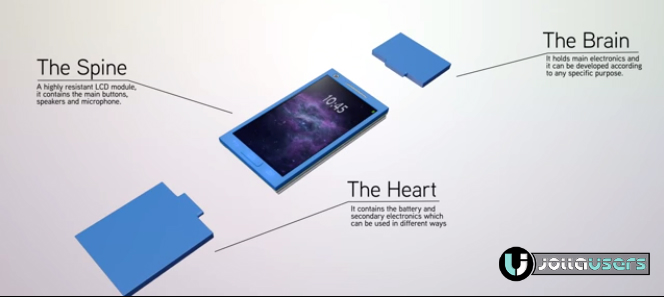
puzzle phone 3 blocks The Puzzle Phone consists of 3 building blocks: the Spine, which is the main body of the phone containing an LCD Screen, main buttons, speakers and microphones; the Brain, which is the module containing the processor and small components like the camera; the Heart, which includes the battery and secondary electronics.
“We are similar to Project Ara but with different physical approaches, in the sense that three pieces are closer to the device’s actual internal distribution, which translates into a cost-effective adoption by the industry,” Circular Devices founder Alejandro Santacreu told ZDNet.
colorsOfPuzzlephone
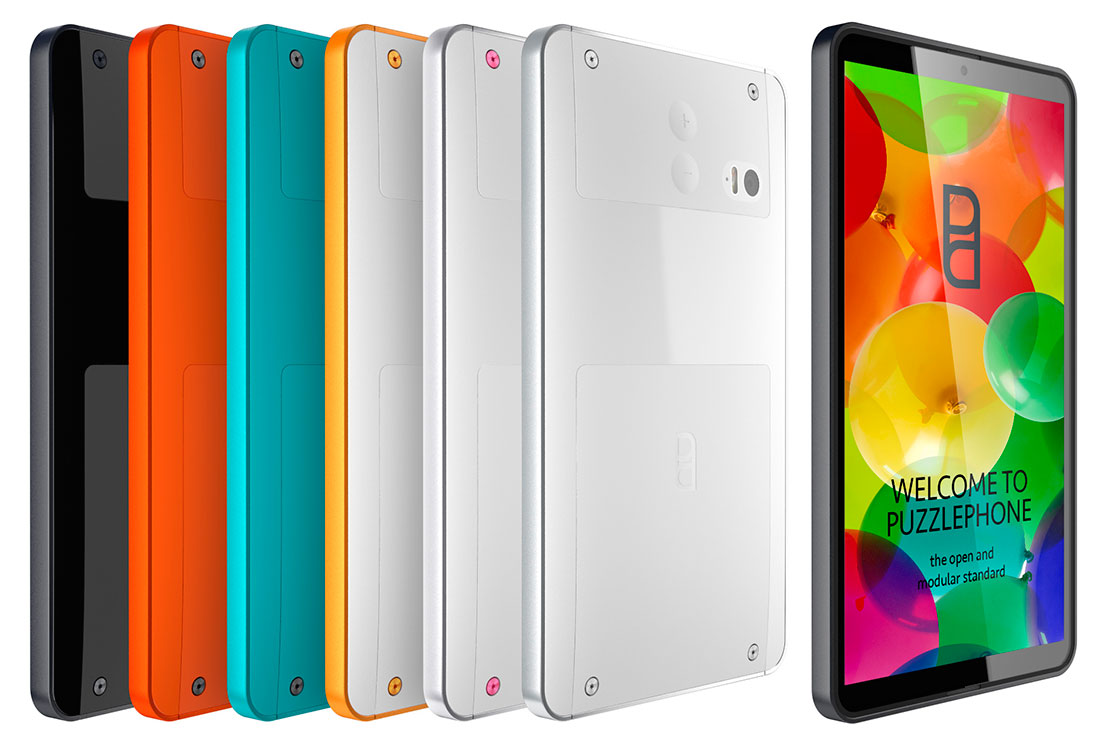
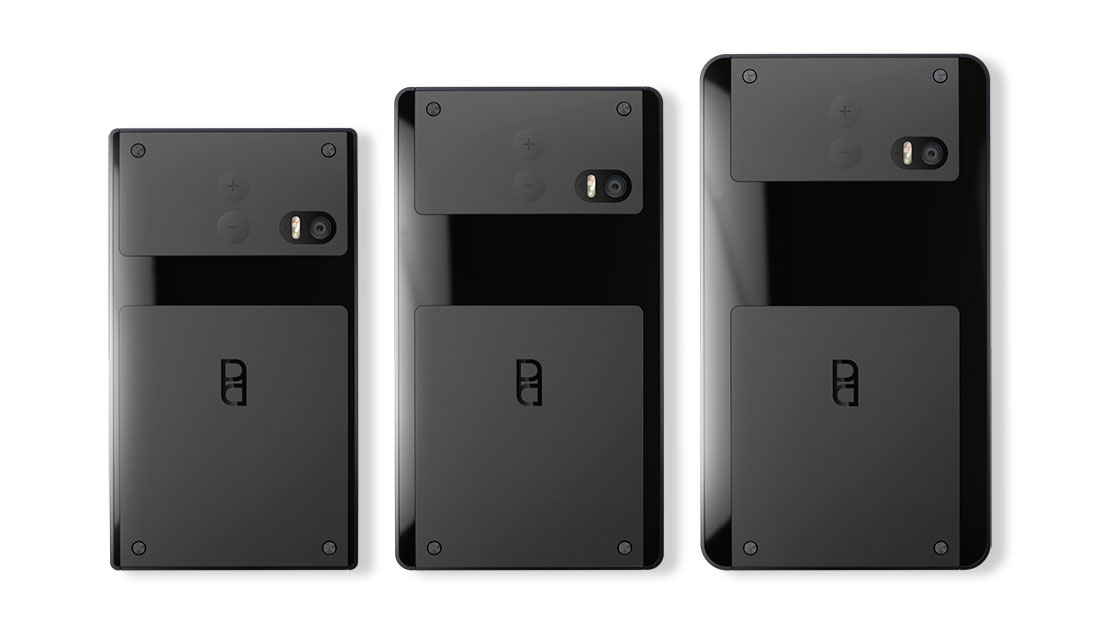
According to the official website, the Puzzle Phone will be available in several colors such as: Black, Orange, Green, Yellow, Silver and more. As well as different display sizes: 4.3 inches, 4.7 inches and 5.0 inches.
puzzle phone different sizes
As a new entry into the cellphone industry, challenges and opportunities coexist. What modular smartphones will bring about changes to the industry and us, we just have to wait and see!

Friday, November 21, 2014

Top 6 iPhone 6 Issues and How to Fix Them

You can use this coupon code: ETSO4BG0 for extra discounts on www.etradesupply.com for order over $50.

Because Apple has made many changes to the brand new iOS 8 and its new generation iPhone devices, leaving some bugs and issues seems unavoidable. Here we’ve collected the top 6 issues and solutions of iPhone 6 and iOS 8 which most people complained about.
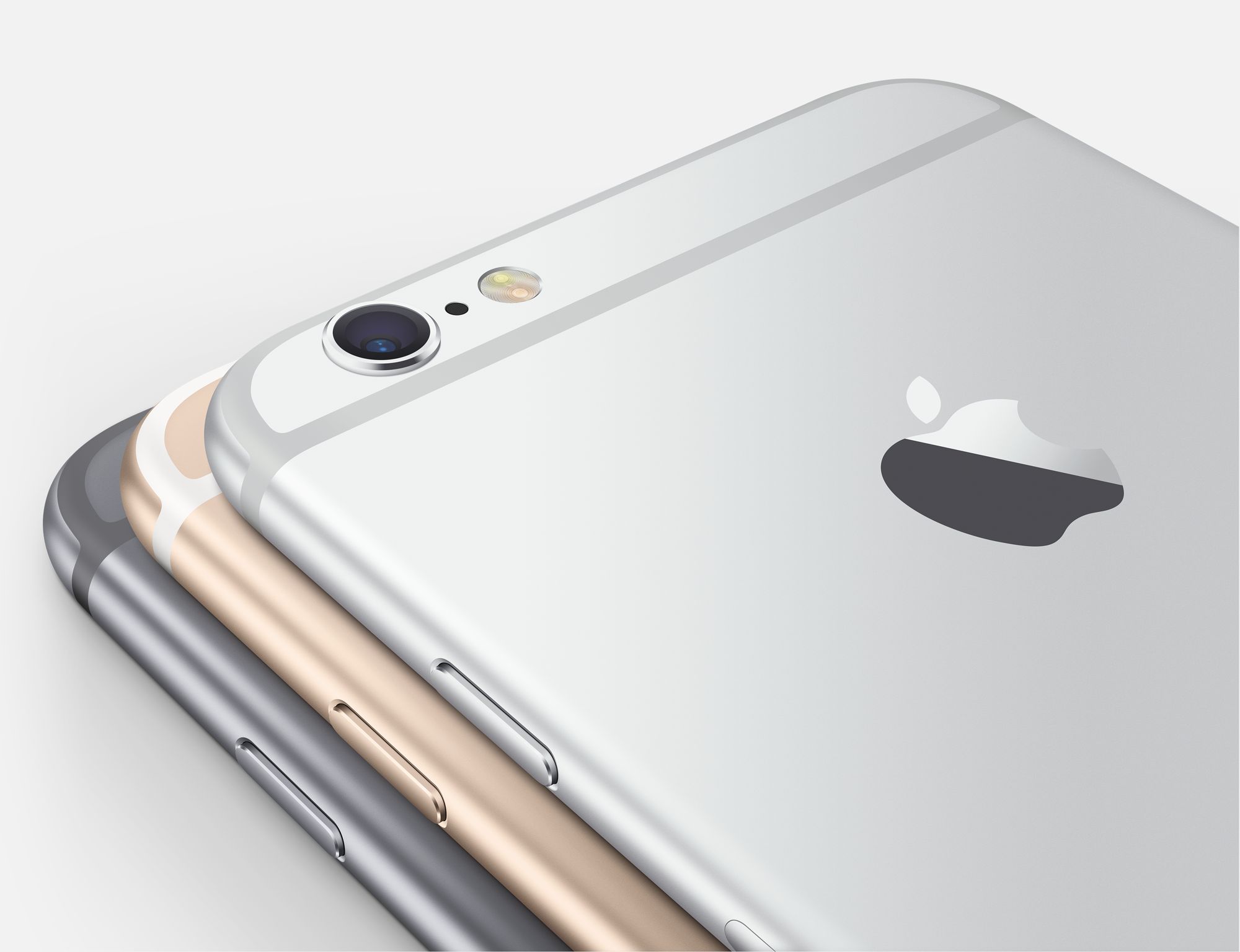
iPhone_6_camera_rear
No. 1 Bend
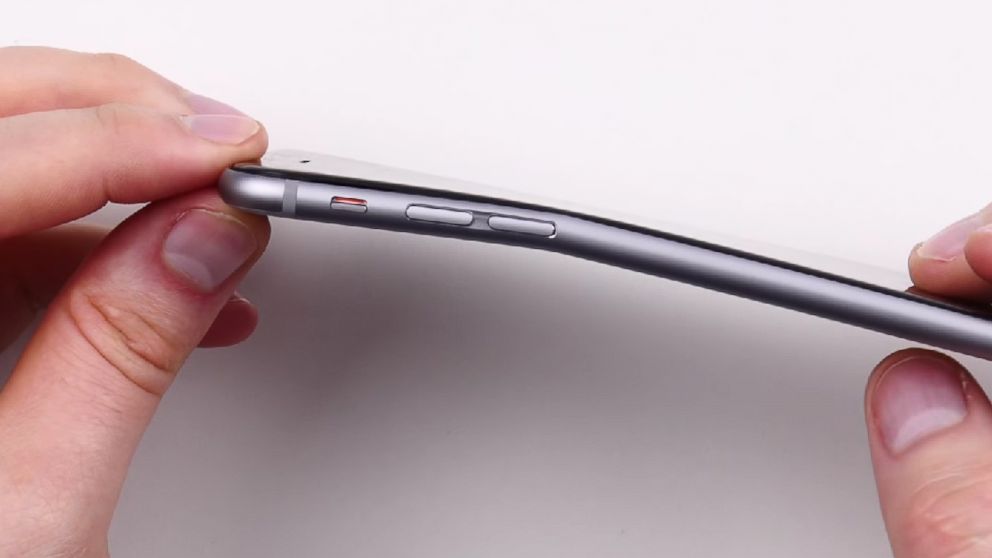
ht_unbox_therapy_iphone_6_plus_bend_test_2_jc_140925_16x9_992
It’s widely known that iPhone 6 suffers from “Bendgate” since it’s released. Even though Apple claimed that “With normal use a bend in iPhone is extremely rare”, a great deal of up-to-date news about iPhone 6 bend still coming forth.
How to fix:
Protect your iPhone 6 with a metal frame, which can protect your phone from being bent greatly.
If your phone has already suffered from bend, you’ll have to replace it with a new iPhone 6 back housing replacement. You may follow our tutorial guide How to Disassemble iPhone 6 if you have any similar DIY repair experience. If not, please turn to local repair shop or Apple store for help.
No. 2 Battery Life
iPhone_6_battery_life
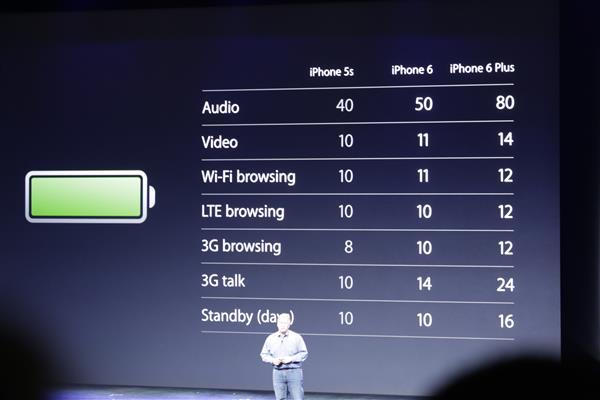
Though the battery capacity of iPhone 6 has been upgraded to 1810mAh and the new A8 chip has been improved a lot in power-saving during it works, the battery life of iPhone 6 is still the top concern among users and potential users. Up until now, it seems many people have already experienced and complained about the battery drain of their iPhone 6. But don’t worry, nearly all battery problems are easy to fix, here we will walk you through some tips of how to fix the iPhone 6 battery drain issues.
How to fix:
It may be caused by a specific app, go to setting Go to Settings > General > Usage > Battery Usage to check which app is draining a speciously high amount of battery, then see if it can be upgraded or not, if not, think about uninstalling it.
Background refreshing can also be the problem, you can simply go to Settings > General > Background App Refresh to disable those you don’t need from refreshing to extend your battery life.
No. 3 Wi-Fi
iOS-6-Wi-Fi-Problems-Fix-iJailbreakcopyright
Seems that many people have experienced Wi-Fi problems since their devices have been upgraded to iOS 8. The Wi-Fi signal appears to be strong, but when you browse the web or load a YouTube video and in some of the extreme cases, the connection seems to drop off totally while others’ devices enjoy the usual speed.
How to fix:
We’ve listed 10 possible solutions to this problem in another article: How to Solve Wi-Fi Problems After Updating iOS 8
No. 4 Random Reboot
iphone-is-frozen
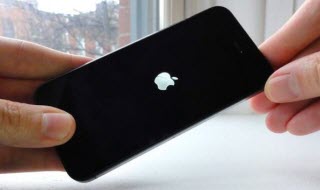
Some users have complained that they experienced random reboot in their beloved iPhone 6. This is an issue which also happened in the iPhone 5 and iPhone 5S, and may occur frequently while users are doing all sort of different things.
How to fix:
Go to Settings> General > Reset and tap Reset All Settings. This won’t make any changes to your apps and files, but you have to enter your passwords and choose wallpaper again.
No. 5 Dye from Jeans
bgr-iphone-6-marked-1
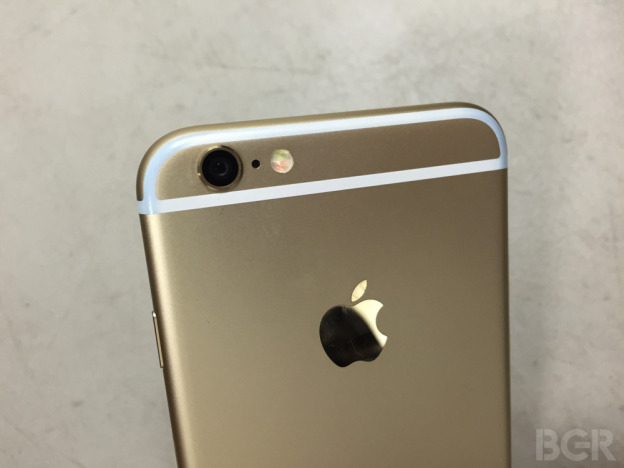
One reader of BGR.com has reported that after sliding his iPhone 6 without a protective case in and out of this jeans pockets for a period of time, the plastic strips on back of the phone was dyed from denim. Hope this is just one extreme case.
How to fix:
Use an iPhone 6 case to protect your phone from touching your jeans or just replace you iPhone 6 back housing.
No 6. Broken glass
iPhone-6-user
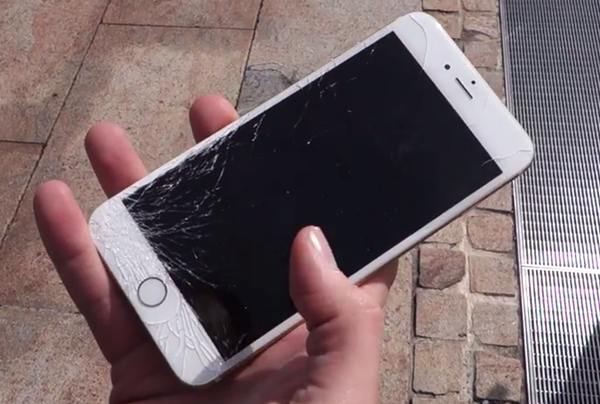
Did you guys ever remember that the first who bought the brand new iPhone 6 in Perth, Sydney Australia? Even without the first touch, he dropped it on the group unfortunately. Since more and more people have same experience like this, you should know how to deal with this problem.
How to fix it:
If you ever have similar DIY repair experience, you could follow our How to repair the iPhone 6 broken screen guide to replace your broken iPhone 6 LCD screen and digitizer assembly, it’s not that complicated.
If you do not have any related experience, you’d better check your local repair shop or Apple store for help.

Redeem your ETS Points for Parts for Cash

http://www.etradesupply.com/thanksgiving/


 thanksgiving day

Monday, November 17, 2014

How to Repair an iPhone 6 Broken Screen


Everyone can use this coupon code: ETSO4BG0 for extra discounts on www.etradesupply.com for order over $50, and it won’t be expire until Dec 31, 2014.

The Apple iPhone 6 features a 4.7-inch display and is protected by fingerprint-resistant oleophobic coating and shatter proof glass. If your iPhone 6’s screen becomes cracked, sending it to a repair shop may not be affordable for you. Perhaps a DIY repair is a better choice if you have some experience or repair skills. Now this tutorial shows you how to replace a broken iPhone 6 screen step by step.

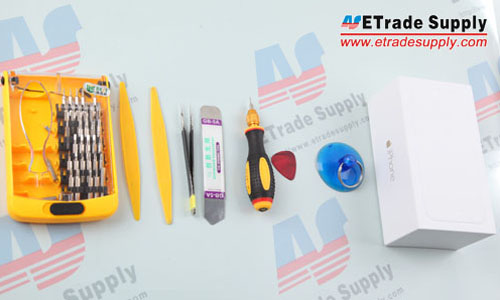
Tools Needed:
Screwdriver
Plastic Spudger Tool
Tweezers
Case Opening Tool
Suction Cup Tool

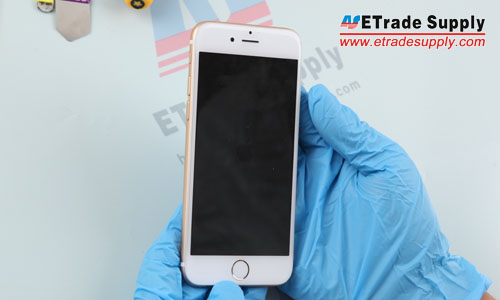
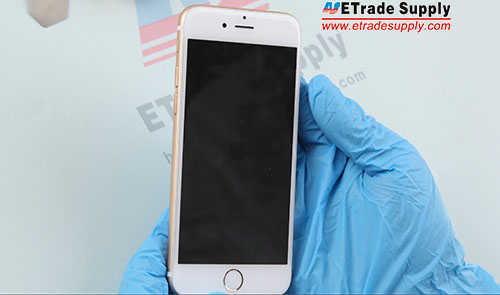
1. Power off the Apple iPhone 6.
iPhone 6 Disassembly
1. Power off the Apple iPhone 6.
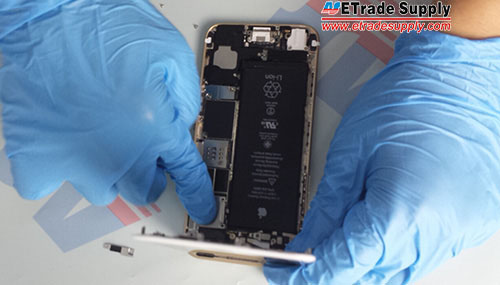
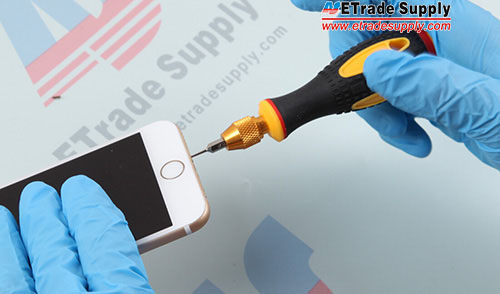
2. Undo the 2 charging port screws. (Notice: there’re lots of different screws inside, mark or separate them when disassembling to prevent confusion.)
2. Undo the 2 charging port screws.
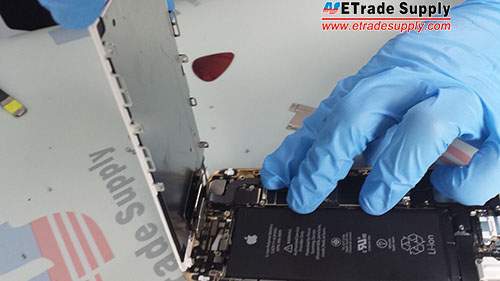
3. Use the suction cup tool and case opening tool to separate the LCD assembly from the rear housing assembly. (Notice: be careful not to damage the flex ribbons.)
3. Use the suction cup tool and case opening tool to separate the LCD assembly from rear housing assembly.
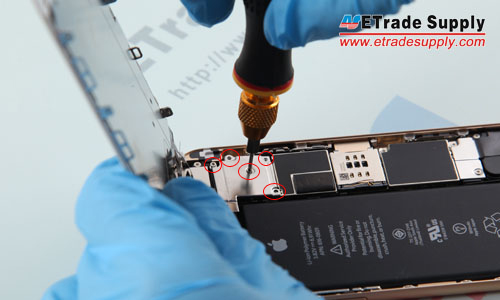
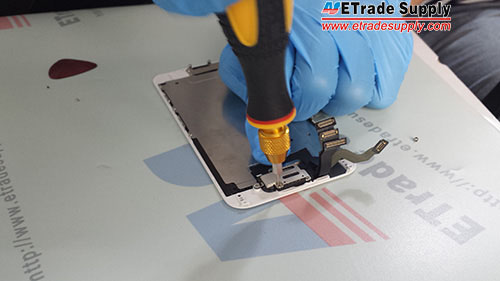
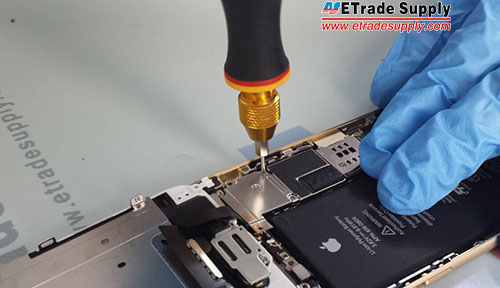
4. Undo the 5 screws that lock the metal cover above the LCD assembly flex ribbon connectors.
4. Undo the 5 screws that locking the metal cover above LCD and Digitizer flex ribbon connectors.
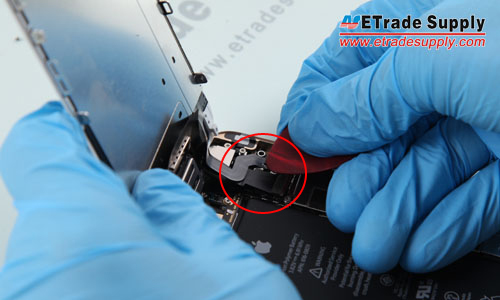
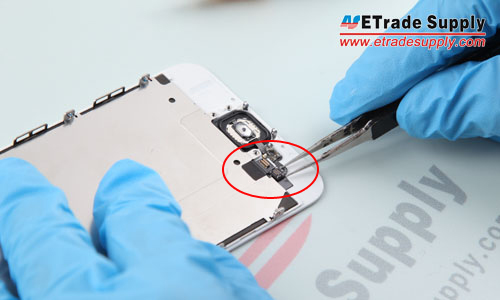
5. Carefully pry up the 3 connectors.
IMG_9771
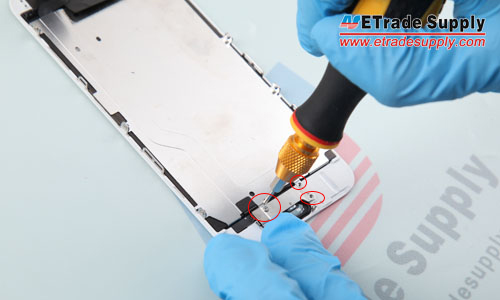
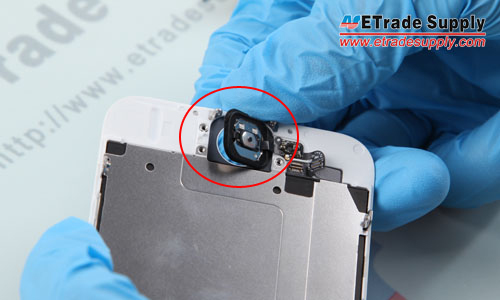
6. Undo the 3 screws from the home button bracket.
7. Undo the 3 screws of home button bracket.
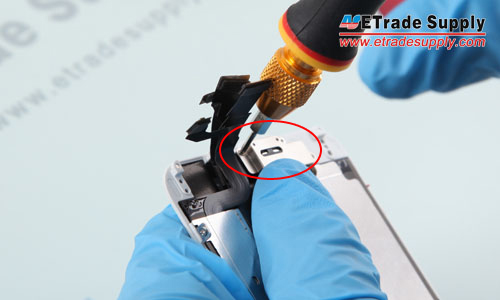
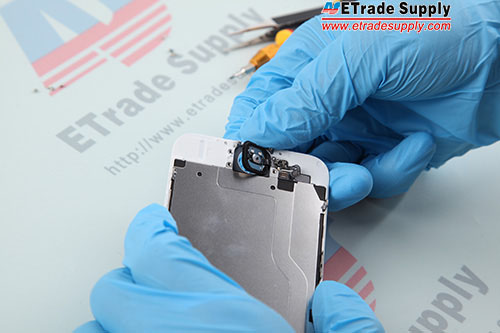
7. Carefully pry up the home button flex ribbon connector, gently poke the home button and take it out.
IMG_9776 8. Pry up the home button flex ribbon connector, gently poke the home button and take it out.
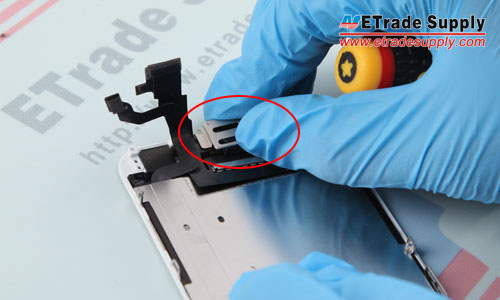
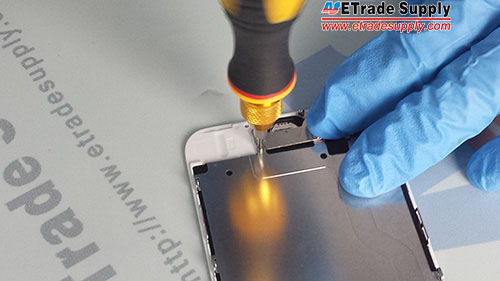
8. Undo the 2 screws that lock the metal cover above the earpiece speaker and front facing camera.
IMG_9779 9. Undo the 2 screws that locking the metal cover above ear speaker and front facing camera.
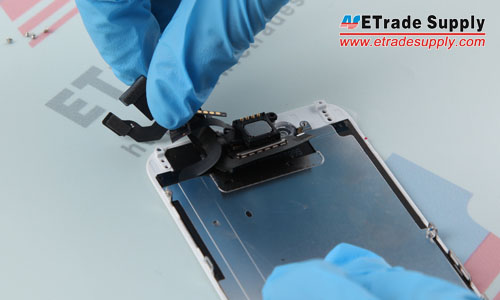
9. Remove the front facing camera and the earpiece speaker.
10. Remove the front facing camera and the ear speaker.
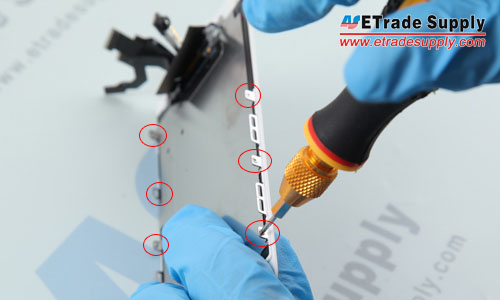
10. Undo the 6 screws that lock the LCD frame and LCD back plate.
11. Undo the 6 screws that locking LCD frame and LCD back plate.
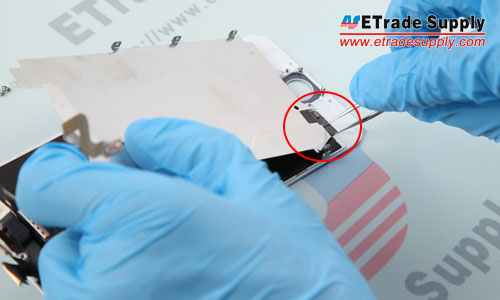
11. Use tweezers to carefully pick up the flex ribbon connector and remove the LCD back plate.
12. Use tweezers to pick up the sticker and remove the LCD back plate.
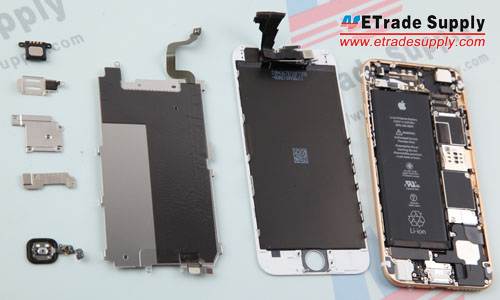
12. Separated the LCD assembly, metal plate and rear housing assembly.
13. Separated LCD assembly, metal plate and rear housing assembly.
13. Reassemble the metal plate and the new LCD assembly replacement, fasten the screws. Then assemble the home button.
IMG_9778
14. Replace the metal cover and lock it with the screws.
20140920_165033
15. Reassemble the earpiece speaker and cover the metal bracket, then fasten it with the screws.
20140920_165426
16. Connect the LCD screen assembly and the rear housing assembly.
20140920_165640
17. Replace the metal cover above the connectors.
20140923194450
18. Lock the metal cover with 5 screws.
20140923194508
19. Assemble the LCD screen assembly and the rear housing assembly.
iphone6 reassembly
20. Fasten the 2 charging port screws. Congratulations you’ve completely replaced your iPhone 6 screen.
QQ截图20140923192631

Monday, March 17, 2014

Apple iPad Air Rear Housing

Apple iPad Air Rear Housing

Everyone can use this coupon code: ETSO4BG0 for extra discounts on www.etradesupply.com for order over $5, and it won’t be expire until Dec 31, 2014.

Specifications:
Color: Silver
Capacity: No Memory Capacity Icon
Material: Aluminum Alloy
Compatibility: Apple iPad Air Wifi+3G Version

Features:
● This iPad Air Rear Housing is for Wifi+3G Version only, please do not confuse it with the iPad Air Wifi Version Rear Housing.

● The Apple iPad Air Rear Housing is carried with the SIM Card Tray.

● This iPad Air Rear Housing does NOT assemble with the frame.
● This Apple iPad Air Back Housing is for Silver and does NOT print with any memory capacity icon.


OEM Apple iPad Air Rear Housing with SIM Card Tray


OEM Apple iPad Air Rear Housing Camera Hole


How to Install / Tips:
● Handle carefully with the Apple iPad Air Back Housing as it is very easy to get scratched.
● Please try to handle the repair or replacement work in a dry and dust free environment without direct sunlight.
●
The installation of Apple iPad Air Rear Housing should be done by a
qualified person. ETS is not responsible for any damage caused during
installation.

Sunday, October 6, 2013

How to Disassemble the iPhone 5C for Screen

http://www.etradesupply.com/blog/how-to-disassemble-iphone-5c-for-screen-repair/

Apple announced the iPhone 5C on September 10, 2013. Different from the iPhone 5, the iPhone 5C is built with brand new plastic rear housing available in five colors: green, pink, blue, yellow and white. However, we found the teardown process and the innards are similar to the iPhone 5 after we took apart the 5C. You can follow our step-by-step disassembly to replace the broken parts on your iPhone 5C, such as the cracked iPhone 5C screen, the useless iPhone 5C battery, the damaged iPhone 5C rear housing or the broken iPhone 5C charging port flex cable. ETrade Supply is always your best choice to get the iPhone 5C replacement parts.
How to Disassemble the iPhone 5C for Screen/Parts Repair
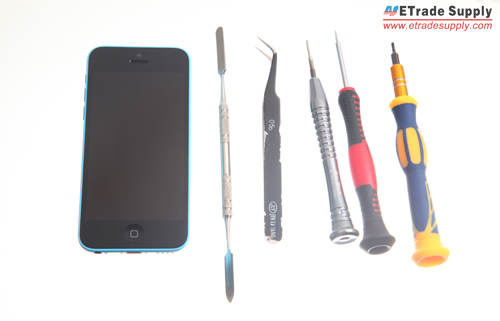
Tools needed:
Pentalobe Screwdrivers
Small Phillips Screwdrivers
Flathead Screwdrivers
Tweezers
Step 1
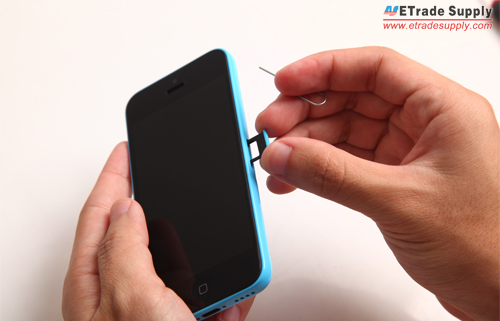
Power off the iPhone 5C and take out the SIM card tray with the eject pin.
take out the SIM card tray
Step 2
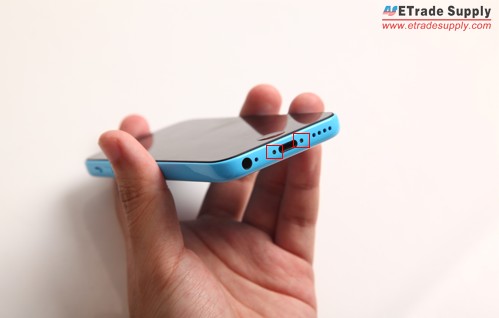
Use Pentalobe screwdrivers to undo 2 screws at the bottom of the handset.
Use Pentalobe screwdrivers to undo 2 screws
Step 3
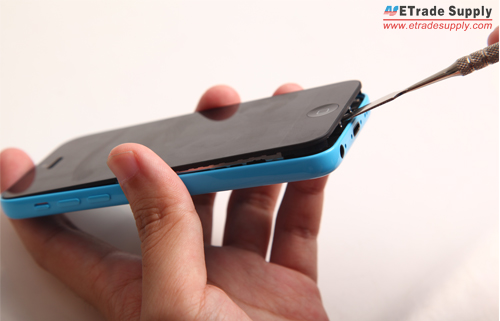
Carefully pry up the iPhone 5C LCD screen assembly with the help of the metal spudger opening tool.
pry up the iPhone 5C LCD screen assembly
Step 4
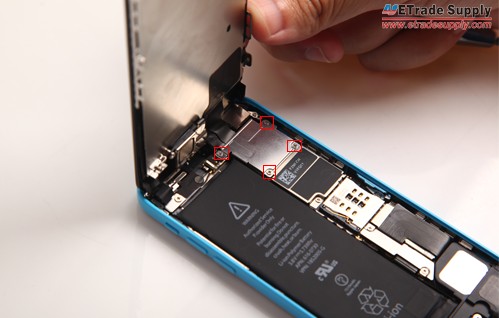
Undo 4 Phillips screws to remove the metal plate covering the LCD assembly connectors.
Undo 4 Phillips screws to remove the metal plate
Step 5
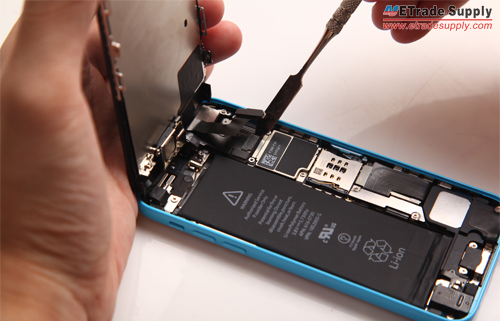
Release 3 connectors to separate the LCD display assembly from the iPhone 5C rear housing with the help of spudger opening tool.
Release 3 connectors to separate the LCD display assembly

NOTE: After the LCD assembly is free, if you need to replace the cracked iPhone 5C screen, now you have to remove the ear speaker assembly and front camera & sensor flex cable at the top of the LCD assembly. And remove the home button at the bottom and the LCD heat shield. Here we didn’t tear them down.

Thursday, September 12, 2013

Apple Unveils Two New iPhones: iPhone 5S and iPhone 5C

iphone-5s
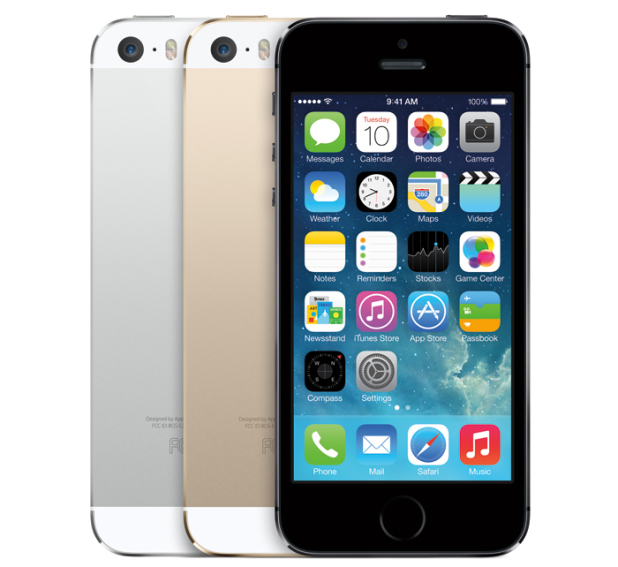
Finally, after months of rumors and leaks, Apple unveils its new generation iPhone 5S. The new flagship has almost the same external design as the current iPhone 5 with only some small changes on the home button and the duel-LED flash. The new handset is available in three official colors: silver, golden and gray.
The iPhone 5S features a new system chip A7 supporting 64-bit, which is pioneering in the field of smartphone. The A7 chip will allow the CPU of the 5S to run up to 40 times as fast as the original iPhone and the graphics to run up to 56 times faster. Another new feature is the fingerprint scanner equipped in the home button. It’s a convenient and highly secure way to access the phone, and it can also approve purchases from iTunes Store, the Apps Store and the iBook Store.
iphone-5C-colorful
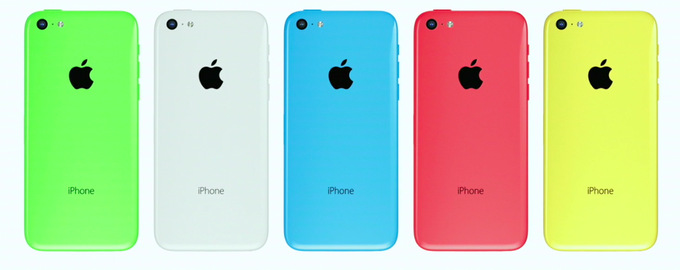
Together with the iPhone 5S introduced in today’s event is the iPhone 5C, which stands for Colorful. There are not many changes from the current iPhone 5 except the color and material of the body housing as well as the operating system. So the iPhone 5C is basically an iPhone 5 wrapped in a Polycarbonate shell in yellow, green, blue, red and white with an upgraded iOS 7.
The iPhone 5S costs $199, $299, $399 respectively for the 16GB, 32GB and 64GB model, and the iPhone 5C $99 and $199 for 16GB and 32GB, all on a two-year contract. The iPhone 5S and iPhone 5C will be released on September 20th in the United States, Canada, Australia, and for the first time at launch, China.